Don't sudo claude -- Build a Privilege Escalation Hook for Claude Code
The Problem
Claude Code runs inside a non-interactive terminal. When it tries to run a privileged command like sudo apt update, Linux replies:
sudo: a terminal is required to read the password
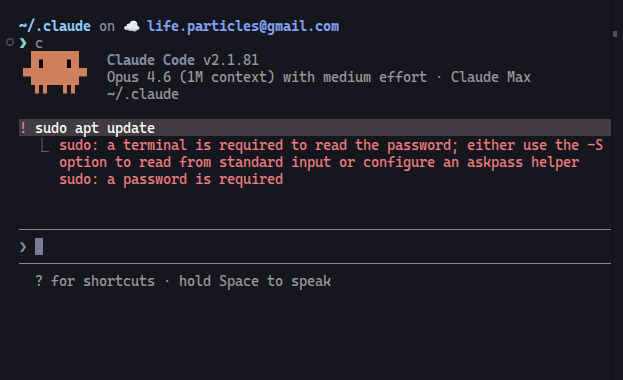
The obvious fix — sudo $(which claude) — is terrible. You’d be handing root access to an AI agent. Every file read, every command, every network call would run as root. That’s not privilege escalation, that’s privilege surrender.
What you actually want: Claude asks for permission per command, you see exactly what it wants to run, and you approve or deny through a GUI popup. Like polkit for AI agents.
The Solution
Claude Code has a hooks system that intercepts tool calls before they execute. A PreToolUse hook on the Bash tool can catch every shell command, inspect it for sudo, and pop up a native dialog.
The flow:
- Detect — regex matches
sudoused as a command (not inside file paths or strings) - Confirm — zenity shows the full command in a popup. You click Allow or Block
- Execute — if allowed, runs with
SUDO_ASKPASSpointing to a zenity password dialog. Output is captured and returned to Claude
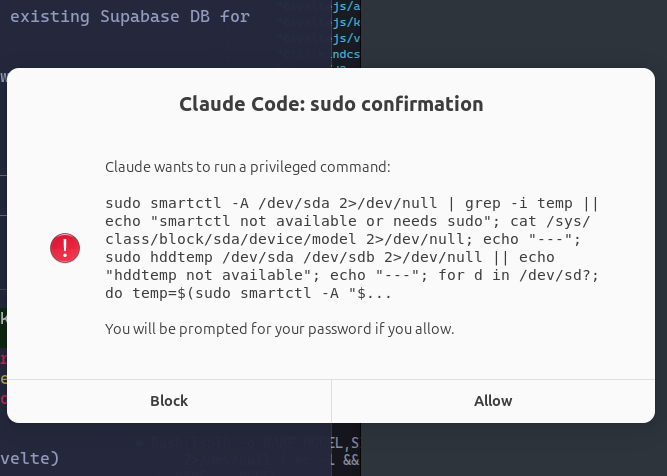
The hook itself executes the command and returns the output. It then exits with code 2, which tells Claude Code to block the original command (since we already ran it). This prevents double execution.
The Code
Two files. That’s it.
sudo-confirm.js (the hook)
This is a PreToolUse hook that reads the command from stdin, checks for sudo, shows a zenity confirmation dialog, and if approved, executes the command with SUDO_ASKPASS set to the askpass script. It uses execFileSync for the zenity dialog (safe, no shell) and execSync for the actual command (needs shell features). The hook captures stdout/stderr and returns them via stderr to Claude, then exits with code 2 to block the original command.
Key design decisions:
- The regex
/(^|&&|\|\||;|\||\$\()\s*sudo\b/matches sudo only when used as a command start, not inside paths like/etc/sudoers - Commands are truncated at 300 chars and HTML-escaped for the zenity display
sudo -Aflag tells sudo to useSUDO_ASKPASSinstead of a terminal- Exit code 2 means “block” in Claude Code hooks — the hook ran the command itself, so blocking prevents double execution
See the full source on GitHub.
sudo-askpass.sh (the password dialog)
A three-line script. sudo -A calls it whenever it needs a password. Zenity pops up a native GNOME password dialog. If the sudo credential cache is still warm, it never gets called at all.
See the full source on GitHub.
Hook Registration
Add this to your ~/.claude/hooks/hooks.json (or settings.json under the hooks key):
{
  "hooks": {
    "PreToolUse": [
      {
        "matcher": "Bash",
        "hooks": [
          {
            "type": "command",
            "command": "bun ~/.claude/scripts/hooks/sudo-confirm.js"
          }
        ],
        "description": "Intercept sudo commands with GNOME confirmation popup"
      }
    ]
  }
}
Setup
- Install zenity:
sudo apt install zenity - Save
sudo-confirm.jsto~/.claude/scripts/hooks/ - Save
sudo-askpass.shnext to it. Make it executable:chmod +x sudo-askpass.sh - Register the hook in your Claude Code settings
- Restart Claude Code
Now when Claude runs any sudo command, you get a native desktop popup showing exactly what it wants to do. No more running Claude as root. No more silent privilege escalation.
macOS Note
This hook uses zenity, which is a GTK/GNOME tool. On macOS, you have two options:
- osascript (native) — replace zenity calls with AppleScript dialogs. The confirmation becomes
osascript -e 'display dialog "..." buttons {"Block","Allow"}'and the password prompt becomesosascript -e 'display dialog "Password:" default answer "" with hidden answer'. No dependencies needed. - Install zenity via Homebrew —
brew install zenityworks, but the dialogs will look out of place on macOS.
The hook logic (detect, confirm, execute) stays the same — only the dialog commands change.
Source
The full hook implementation is managed with chezmoi and lives in ninyawee/dotfiles. Clone the repo or grab the two files directly:
sudo-confirm.jssudo-askpass.shhooks.json(full hook registration with other useful hooks)